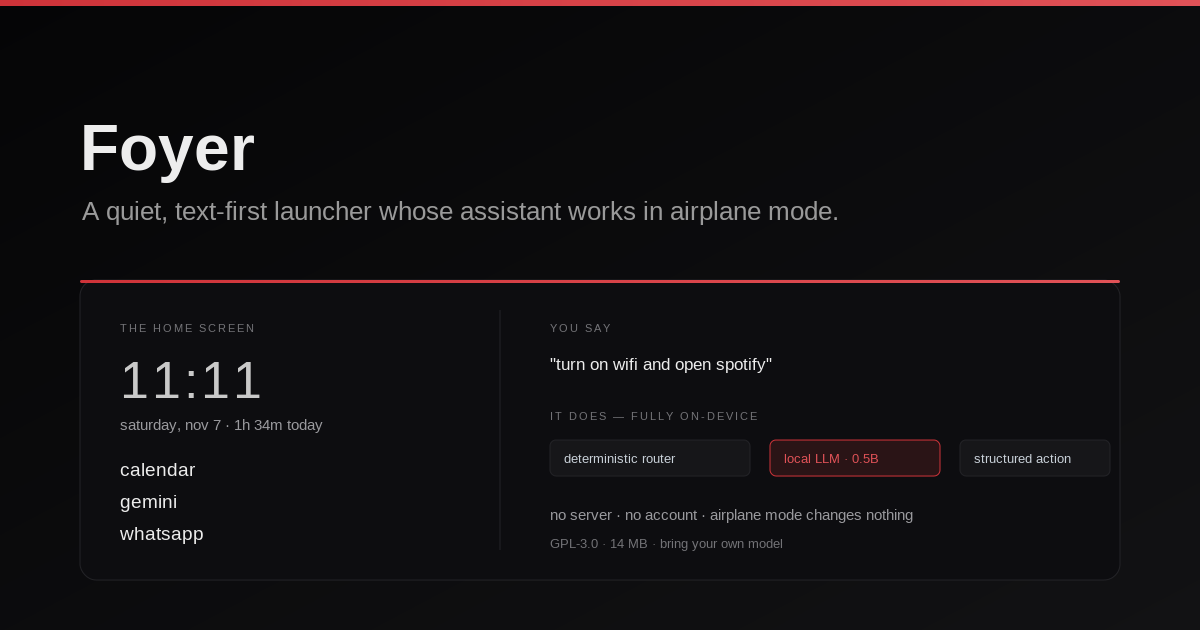
My home screen had become a casino floor: forty coloured icons, each engineered to be tapped. I wanted the room you pass through on the way out, not the room you get stuck in. So I built Foyer — a text-first Android launcher that is now live on Google Play, GPL-3.0, with every line on GitHub.
The launcher part is deliberately small. The home screen is a clock, your favourite apps as a plain-text list, and nothing else. The full app list is one swipe away behind an a–z rail. Screen time sits quietly under the clock — not an app you open, just there, every time you glance at the time.
Limits that ask, not forbid
Every hard-block tool I tried taught me one skill: uninstalling the tool. Foyer’s intervention model is softer, and it’s the part that has actually stuck for me.
You can mark apps as distracting — they dim in the list. You can give an app a daily budget: instagram, twenty minutes. When the budget runs out, Foyer doesn’t block the launch; it pauses it and asks. One conscious tap buys five more minutes.
The friction is tiny, but it’s conscious friction — exactly the thing a hard block removes. The bypass itself becomes the reminder, and that turns out to be enough.
The assistant: a router first, a model second
The thing I actually set out to build is the assistant. Every launcher assistant on the market is a microphone wired to someone’s server, which felt wrong for the most personal screen you own. Foyer’s assistant runs entirely on the phone: type or say “turn on wifi and open spotify” and both things happen — in airplane mode, identically.
The design has two tiers, and the ordering is the whole trick:
- A deterministic router goes first. Obvious grammar — “open X”, “call Y”, toggles, chained “and” commands — resolves instantly in plain code against a local app index. No model, no latency, no ambiguity about what will happen.
- The local LLM is the fallback, not the engine. Only input the router can’t resolve reaches the model, and the model’s job is narrow: return a structured action — an intent plus slots. The same plain code that serves the router executes it.
The model never free-runs and never executes anything itself. That keeps the common path instant, and it keeps the prompt-injection surface small: a maliciously named app can’t smuggle an instruction, because app labels are matched against the local index, not interpreted as text.
Bring your own brain
Foyer ships no model weights. You bring any MediaPipe .task model: the settings page offers one-tap suggestions — Qwen 2.5 (0.5B or 1.5B, Apache-2.0, downloads from Hugging Face with no account at all) and Gemma 3 — or you paste any URL you trust. Downloads are verified against pinned SHA-256 checksums, fetched over HTTPS only, and if you use a Hugging Face token it never leaves the device: it’s excluded from Android’s cloud backup and redacted from logs.
A 0.5B model (~550 MB) is genuinely enough for command intent. The 1.5B is noticeably better at fuzzy references. Either way the processor is busy only in the moment you ask something; there is no background service.
1.1.0: the home screen comes loose
This week’s release makes the home screen flexible without giving up the text-first idea.
The clock and favourites are now movable. Long-press the home background and both blocks come loose, Pixel-style: drag them anywhere on a grid (faint grid lines fade in while you drag, so the snap targets are visible exactly when they matter), pull edge handles to resize, pick the grid density — 5×8, 6×10 or 7×12. The clock scales with its box; the favourites list shows as many rows as fit. Still text. Still quiet. Just where your thumb lives.
Wallpapers, privately. You can set a wallpaper from your photos. It’s picked through Android’s system photo picker, so Foyer never gets access to your library — only the one image you chose, which is downsized and stored privately, drawn under a soft scrim so the text stays readable. No storage permission is requested, because none is needed.
One photo, a whole theme. The feature I’m most fond of: flip one switch and the launcher recolours itself from the wallpaper’s own colours. The extraction is deliberately boring — a dependency-free histogram, pixels bucketed at five bits per channel; the most populous bucket becomes the surface, the best saturation-weighted bucket far enough from it becomes the accent. The palette is then derived, never sampled blindly: ink follows the surface’s luminance, muted blends toward it, and a low-contrast accent gets pulled toward the ink until it reads. Contrast is computed, not hoped for. Turn the switch off and your chosen theme comes back untouched.
The quiet parts
No account, no ads, no analytics, no tracking, no notification access. The only network call is the model download you explicitly start. The permissions that exist are explained at the point of use: microphone for voice, usage access for screen time, notifications for the limit nudge. The app is 14 MB.
And it’s all GPL-3.0. The architecture is a single-activity Compose app with plain snapshot-state holders — no ViewModel, no Hilt, no Room — and the reasons for those choices are written down in the repo. Read every line; that’s the point.
Foyer is on Google Play, the signed APK is on every GitHub release, and the source is at github.com/akshay2211/Foyer. If you try it, I’d genuinely like to hear whether “ask, don’t forbid” works for you.
Discussion
Leave a comment or react
React with an emoji or start a thread — comments are stored on GitHub Discussions.